Guide
How to Use Claude Code for Large Projects
Claude Code Tutorial: Mastering Large Projects Effectively
Estimated Reading Time: 8 minutes
Key Takeaways
- Understanding the role of Claude Code in large projects.
- Key setup and organizational strategies to maximize productivity.
- Best practices for handling large codebases, context management, and planning.
- How to efficiently implement and review complex tasks using Claude Code.
Table of Contents
- What Makes Claude Code Work for Large Projects
- Setting Up the Workspace and “Harness”
- Structuring Large Projects for Claude
- Working with Large Codebases: Scoping and Context Management
- Planning and Multi-Phase Workflows for Large Tasks
- Concrete Usage Patterns for Large Projects
- Limitations and Realistic Expectations
- Practical Checklist for Using Claude Code on Large Projects
What Makes Claude Code Work for Large Projects
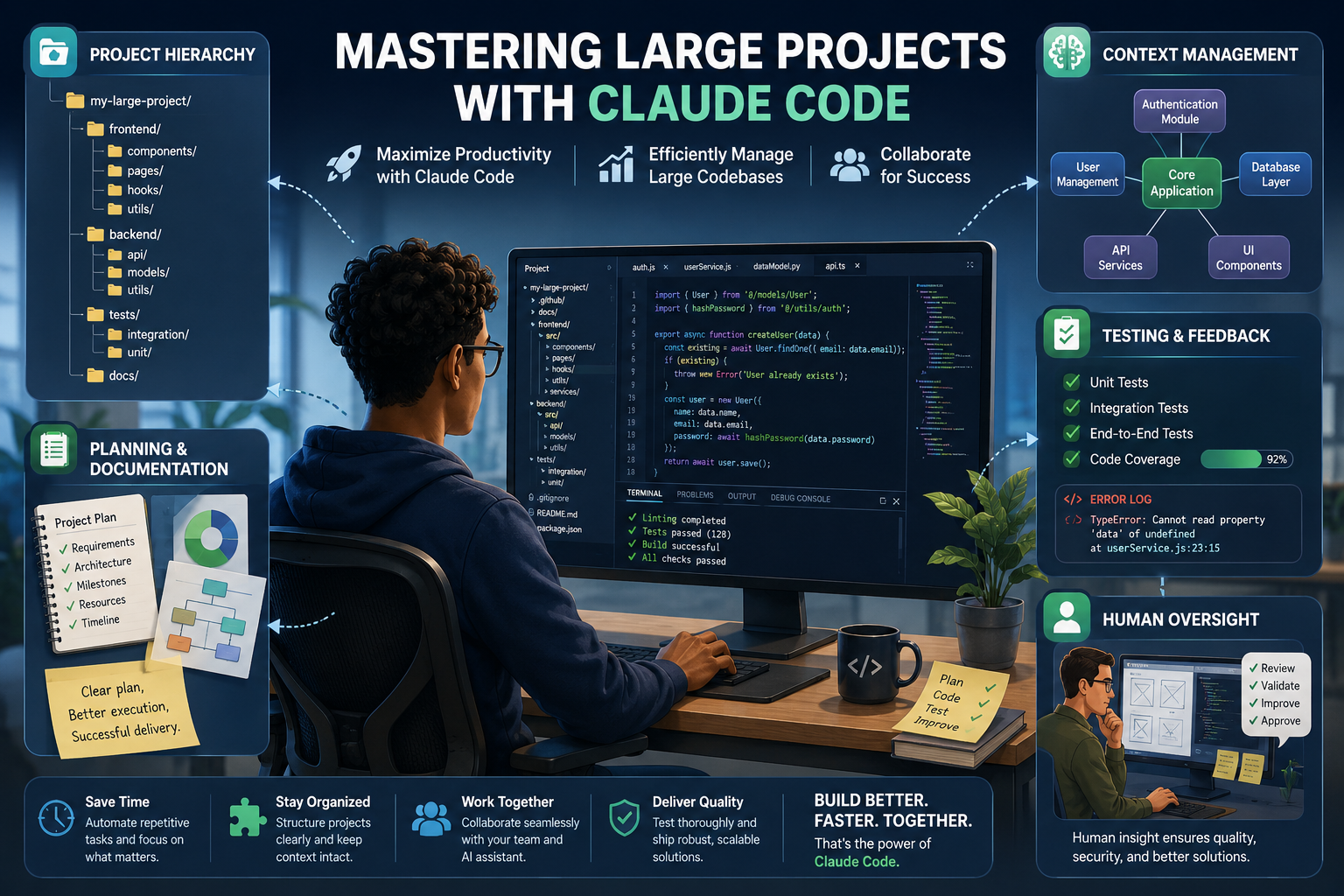
For medium and large projects, Claude Code shines when humans take charge of architecture and planning. Its primary role is to handle the finer details of implementation and exploration. Large deployments, especially with monorepos containing millions of lines of legacy code, thrive when teams focus on Claude's integration (the harness) rather than solely the model being used.
Key Components for Successful Large Projects:
- Clear Project Architecture: Define a robust and coherent structure to facilitate Claude's operations.
- Strong Planning: Break work down into manageable tasks, allowing Claude to function effectively.
- Context Management: Keep control over extensive codebases to ensure Claude doesn’t become lost in complexity.
- Continuous Testing: Employ regular feedback loops to refine outputs.
- Documentation: Maintain thorough records of both plans and progress, enhancing project transparency.
- Human Oversight: Ensure that a professional evaluates designs and critical paths to maintain project integrity.
Treat Claude not as a mere code generator but as a collaborated assistant within a structured environment, allowing your project to flourish. Detailed Research
Setting Up the Workspace and Harness
Having a well-configured Claude Code setup is pivotal for handling large projects effectively, often more impactful than which specific model is in use.
Essential Components for a Good Setup:
-
Dedicated Workspace Folder: Establish a primary workspace directory on your machine (e.g., in your home folder) to organize your project effectively. Open this folder in Claude Code or your preferred code editor (like VS Code).
-
Project Folder Structure: Develop a hierarchical project layout that differentiates backend, frontend, tests, scripts, etc. Within these, create further subfolders for controllers, routes, models, services, components, pages, and assets. This modular design aids Claude's navigation and keeps updates localized.
-
Initial Claude Code Workspace: Start by opening the project folder in Claude Code and executing an initial bootstrap or interview to familiarize Claude with your project organization.
-
CLAUDE.md Files: Utilize lightweight instruction files to guide Claude's interactions with your repository.
- Root CLAUDE.md: Provide a comprehensive overview of the project, including essential conventions, and notable “gotchas” without overwhelming Claude with irrelevant details.
- Subdirectory CLAUDE.md: Specify local conventions, build/test commands, and any particular rules for distinct services or modules.
Keep CLAUDE.md files lean and layered, ensuring Claude absorbs relevant instructions without unnecessary clutter. Detailed Research
Structuring Large Projects for Claude
An effective project structure is foundational in enabling Claude to manage extensive codebases successfully.
Key Structuring Strategies:
-
Modular Design: Segment functionality into separate files/modules, each assigned distinct responsibilities. This allows Claude to concentrate on individual areas without confusion.
-
Multi-File Application Structure: Allocate different files for HTML, CSS, and JavaScript, separating frontend and backend operations. Claude can then efficiently link these files based on high-level descriptions you provide.
-
Repository Maps: In cases of complex directory structures, create a markdown “map” summarizing each top-level folder and its contents for Claude to review before diving into files.
-
Document Conventions: Clearly articulate edge runtimes, component design standards, test colocation principles, API guidelines, and other recurring patterns within your CLAUDE.md.
These strategic choices reduce cognitive load and position Claude to understand architectural contexts effectively, transforming it into a competent team member instead of a tool searching through tangled files. Detailed Research
Working with Large Codebases: Scoping and Context Management
Claude works best when it isn’t overloaded with the entirety of a massive codebase. Thus, managing the workflow and context is crucial.
Best Practices Include:
-
Initialize in the Relevant Subdirectory: Start sessions in the specific part of the repository that relates to the current task—this keeps Claude's focus narrow and helps prevent time-outs from reading extraneous code.
-
Scoped Testing and Linting: Define commands per subdirectory within the CLAUDE.md, allowing Claude to execute only the relevant tests and lints for recently modified files.
-
Context Monitoring and Compaction: Keep track of context use and compact or reset at logical points—after completing a feature, switching focus, or reaching around 70% context usage. Compaction involves summarizing current work into concise documentation to clear out older, irrelevant details.
-
Progress Logs (PROGRESS.md): Before context saturation, request Claude to compile its plans, completed steps, remaining tasks, vital decisions, and affected files into a PROGRESS.md file. Subsequently, clear the session and start anew, using the PROGRESS.md for seamless continuation.
-
Subagents for Complex Searches: For extensive tasks, like locating every instance of a particular API call, delegate the search to a subagent that returns a structured list, conserving context for clearer outputs.
-
Symbol-Based Navigation: By utilizing Language Server Protocol (LSP) tools, enable Claude to search by symbol rather than raw text, minimizing irrelevant matches for common function names.
Employing these practices enables Claude to efficiently break down a sprawling codebase into manageable tasks, enhancing its overall effectiveness. Detailed Research
Planning and Multi-Phase Workflows for Large Tasks
Undertaking large features and refactors requires a systematic workflow that ensures Claude works through defined plans rather than improvising.
A Proven Workflow Outline:
-
Gather Context
- Point Claude to the relevant workspace or directory.
- Supply CLAUDE.md, architectural documents, and any supporting diagrams (like UML).
-
Clarify Requirements and Constraints
- Engaging Claude in plan mode or through a planning prompt helps explore the codebase, pose pertinent questions, and establish a high-level plan.
- Ask Claude to first conduct an “interview” with you to discern goals, constraints, and non-negotiables before proposing solutions.
-
Create and Review Implementation Plans
- Prepare a high-level implementation plan or diagram for medium and large tasks; Claude's reliability increases when carrying out human-configured plans.
- Confirm that Claude iteratively refines the plan and highlights any unresolved questions or risks.
-
Execute in Batches
- Implement alterations in self-contained batches (ideally of 5 to 20 files) which are independent and testable.
- Instruct Claude to modify only the files necessary for each batch and keep the batch focussed around a single aspect of the feature.
-
Continuous Testing and Feedback
- Conduct unit tests, integration tests, and lint checks for each batch, feeding the results back to Claude for problem resolution.
- Provide error logs and pertinent feedback—this step is critical to mitigate subtle bugs.
-
Compact and Move On
- After completing a batch or feature, summarize progress and details in PROGRESS.md or similar documentation, then reset context before initiating a new task.
This disciplined approach minimizes regressions and maximizes Claude's collaborative potential as your project expands. Detailed Research
Concrete Usage Patterns for Large Projects
From various tutorials and real-world applications of Claude Code, several methodologies have emerged as repeatable patterns.
Effective Patterns Include:
-
Initial Setup and Smoke Test
- Install Claude Code alongside your editor of choice (e.g., VS Code or Claude Desktop). Create a dedicated workspace folder and load a starter project.
- Import existing files or repositories, perform an initial bootstrap interview within Claude Code, and run a basic smoke test to confirm functionality.
-
Plan-First Large Builds
- For significant applications, use a planning phase to outline architecture, page structures, APIs, data models, and integrations before directing Claude to generate code.
-
Module-by-Module Development
- Define a particular module (like “user profile service”), focusing on refinement, input/output expectations, and relationships with other modules.
-
Multi-File Application Creation
- Instruct Claude to build out multi-file applications (HTML, CSS, JS/React) with clear separations, allowing you to visualize outputs in real-time.
-
Production Workflows Integration
- In production scenarios, integrate Claude into existing techniques: collate context, clarify unknowns, develop and verify plans, then implement in increments before peer reviews.
Leveraging aligned architectural documents (UML, ADRs), alongside implementation blueprints, ensures Claude operates safely and effectively without generating its own structures. Detailed Research
Limitations and Realistic Expectations
Despite its strengths, Claude may struggle with excessively tangled code or loosely structured repositories. Realistically, here’s how to view Claude's role:
- Powerful Assistant: Claude is invaluable for reading, modifying, and grasping large codebases.
- Effective Planner: It excels in breakdown complex tasks into manageable components and provides guidance throughout.
- Not a Replacement: Claude should not substitute for human oversight on architectural decisions or critical system reviews.
While Claude is adept at handling extensive projects, expect challenges when dealing with poorly crafted or interrelated codebases that may obscure crucial details. Detailed Research
Practical Checklist for Using Claude Code on Large Projects
Transform this knowledge into a precise, actionable checklist to maximize your Claude Code experience:
- Create a dedicated workspace folder and open it in Claude Code. Source
- Develop or import a well-structured project with distinct backend/frontend/tests subfolders. Source
- Include a root CLAUDE.md outlining the big picture, conventions, and main commands. Source
- Compose CLAUDE.md files in critical subdirectories with specific patterns and test/lint commands.
- Create a markdown repository map if the directory layout isn’t straightforward.
- Conduct an initial bootstrap interview in Claude Code to familiarize it with the project norms. Source
- Before embarking on large tasks, gather context and clarify inquiries, working with Claude to devise a plan.
- Execute modifications in small, manageable batches, running tests and relaying feedback back to Claude.
- Document plans and progress in PROGRESS.md or similar records for continuity post-session resets.
- Monitor context usage; compact at strategic checkpoints and reset sessions when shifting focus.
- Maintain human authority over architecture, using Claude primarily for implementation, refactoring, and exploration.
When used strategically, Claude Code transforms into a scalable companion that significantly enhances productivity while managing large codebases. Source
By following this Claude Code Tutorial, you will be equipped to utilize Claude Code effectively across large projects, driving improvements in workflows and enhancing collaborative efforts.
2 curated tools below.

ChatGPT
ChatGPT is OpenAI's flagship conversational AI on web, mobile, and desktop. It covers writing, coding, research, image/video, voice, and agentic work. As of late 2026, paid Work and Codex surfaces expose the GPT-6 family (including GPT-6.1 Sol), while Pro/Business Premium users in eligible markets get OpenAI Dots: always-on agents with their own cloud computer.

Claude
Claude is Anthropic's AI assistant for nuanced writing, long-context reasoning, and coding via Claude Code. The Claude 5.5 family (including Sonnet 5.5, launched September 28, 2026) is the current default for fast, cost-efficient professional and coding work on claude.ai and the Claude API.