Guide
Fish Audio voice cloning: how to get clean, ethical results
Estimated reading time: 12 minutes
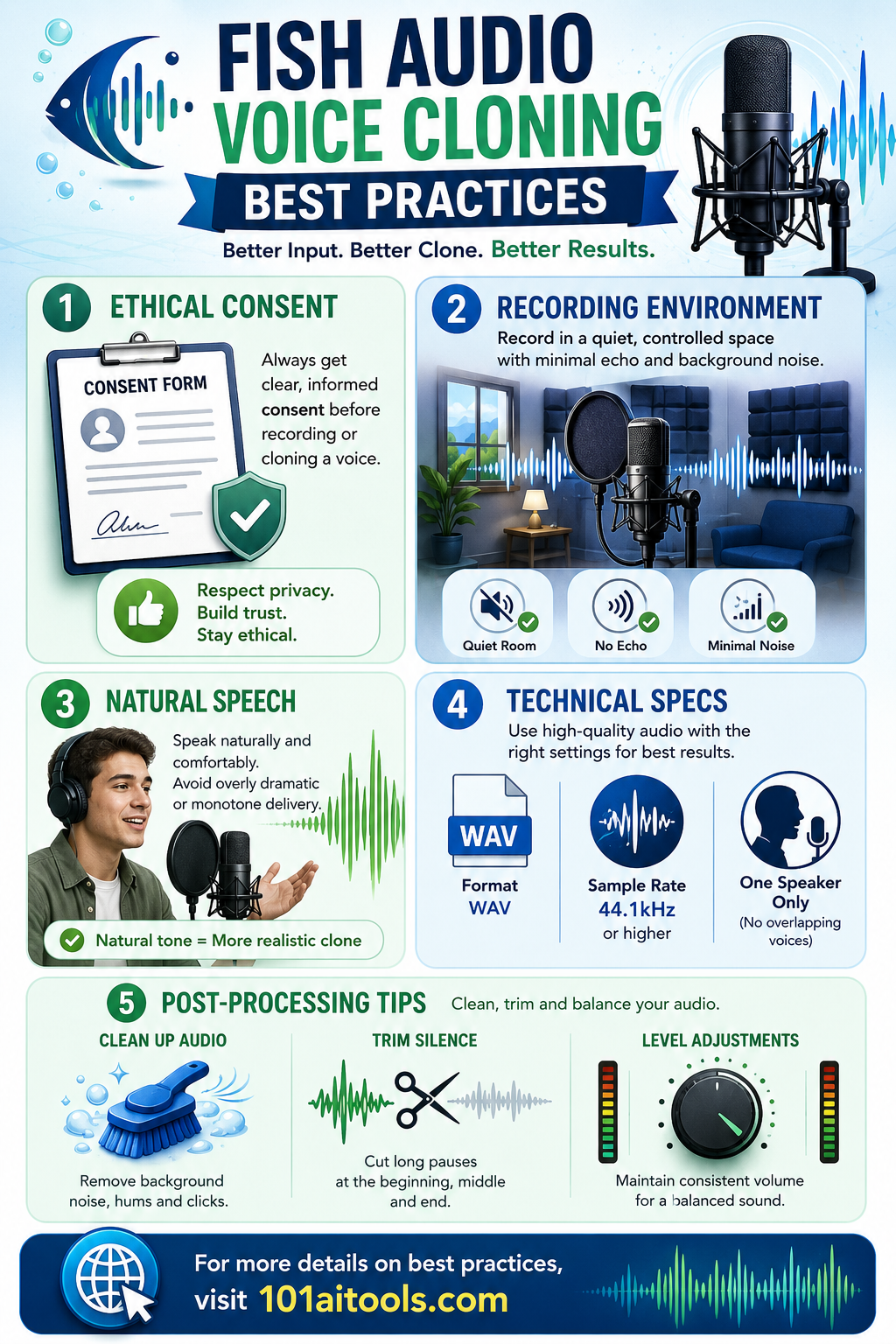
Most voice-cloning guides bury the two things that actually decide whether a clone is usable: whether you have real consent, and whether your source audio is clean. Everything else, mic choice, script wording, generation settings, is a tuning detail on top of those two. Fish Audio can produce a convincing clone, but only if you feed it the right input and handle the process responsibly.
Key takeaways
- Fish Audio voice cloning needs clear consent and a legitimate purpose before anything else.
- The best recordings come from a quiet room, a decent mic, and one speaker only.
- A clone learns from natural speech, steady levels, and clean files, not from volume.
- Clean, consistent audio beats a longer but noisy dataset almost every time.
- Poor recordings degrade results no matter how good the underlying model is.
- Background noise, clipping, mixed speakers, and heavily processed audio are the four fastest ways to ruin a dataset.
Table of contents
- What Fish Audio voice cloning needs most
- Ethical and governance best practices
- Recording environment and equipment for Fish Audio
- Speech performance and script design
- Technical audio specs and levels
- Dataset quantity, variety, and consistency
- Cleaning and post-processing your audio
- Platform tips for better Fish Audio results
- Common mistakes to avoid
- FAQ
What Fish Audio voice cloning needs most
A good clone starts before you press record. In order of priority:
- Explicit permission from the speaker
- A clear use case and documented consent
- A quiet, low-reverb room
- Single-speaker clips
- Natural, steady speech with consistent levels
- Clean audio files with minimal noise
That list splits into two groups, and both matter: ethical and operational safeguards, and technical audio practice. Skip either one and the clone suffers, or worse, gets misused.
Sources: Fish Audio's voice cloning best practices, Kenneth Lamar's voice clone guide, CloneMyVoice's 2026 best practices, Spokio's voice cloning guide
Ethical and governance best practices
Consent and intent
Get explicit, preferably written consent before you record or train a clone. Tell the speaker how the voice will be used, stored, and shared, not just that it will be. Accessibility, localization, branding, entertainment with permission, and internal demos are reasonable uses. Impersonation, fraud, deception, and fake endorsements are not, and no amount of technical polish makes them acceptable.
Sources: Inworld AI's voice cloning best practices, Play.ht's AI voice cloning tips
Rights, transparency, and disclosure
If you're working from existing recordings (podcasts, audiobooks, courses), check copyright and performance rights before you use them as training data. Where confusion is possible, disclose the synthetic audio. A one-line label like "This audio was generated with a synthetic voice" costs you almost nothing and preserves trust.
Sources: Inworld AI, Spokio
Identity verification and logging
Keep records of who consented, which files were used, when the clone was created, and who has accessed it since. Access logs and version history aren't bureaucratic overhead here, they're what let you answer a misuse question quickly instead of guessing.
Sources: Inworld AI, Fish Audio
Access control and misuse monitoring
Limit who can generate audio with a given clone, monitor how it's used, and be ready to revoke access or disable the clone if something goes wrong. Check in periodically on where clones actually end up: social media, ads, support calls, wherever they might drift beyond the original use case.
Sources: Inworld AI, Fish Audio
Recording environment and equipment for Fish Audio
Quiet room
Pick a low-noise, low-reverb space and treat that as non-negotiable. Fans, air conditioning, traffic, music, and background conversation all leak into the training data and are hard to remove afterward. Soft furnishings, curtains, carpet, or even a closet full of clothes will cut down reflections if you don't have a treated room.
Source: Fish Audio's best practices
Microphones and placement
Use an external USB or dynamic mic, or a modern smartphone mic if that's what you have. Skip laptop built-in mics; they're the weakest link in most home setups. Keep the mic 4 to 8 inches (10 to 20 cm) away, use a pop filter, and angle it slightly off-axis to cut down plosives. Make sure it's unobstructed and the setup won't shift mid-session.
Source: ElevenLabs' voice cloning tips
Speech performance and script design
Natural, clear delivery
Speak the way you'd talk to a person in the room, not the way you'd narrate a documentary, unless a more dramatic style is actually what you're going for. Moderate pace, clean enunciation, and avoid mumbling or slurring words together.
Source: Inworld AI
Emotional range and styles
If you need expressive output later, record for it now. Cover neutral, friendly, excited, questioning, and instructional lines, and mix in different roles (narration, dialogue, instruction) while staying true to how the speaker actually talks.
Source: CloneMyVoice
Script selection
Use phrasing the speaker would naturally say: personal stories, daily routines, familiar topics. Deliberately include the words that tend to trip models up, names, brand terms, jargon specific to your use case, so the clone learns them early instead of guessing later. Provide transcripts wherever you can; the model matches wording more accurately when it isn't inferring from audio alone.
Source: Fish Audio
Pauses and phrasing
Natural pauses teach the model rhythm and timing, so don't edit them all out. What you do want to minimize: filler words ("um," "uh"), long hesitations, and false starts, since those get learned just as readily as the good habits.
Source: Inworld AI
Technical audio specs and levels
File formats and sample rates
WAV (Linear PCM), uncompressed, is the safe default. Aim for 22 kHz or higher, and use 44.1 kHz/24-bit or 48 kHz/24-bit if your equipment and the platform both support it. If you have to use a compressed format, stick to high-bitrate MP3 (around 320 kbps) rather than anything lower.
Source: ElevenLabs' professional voice cloning docs
Levels and clipping
Keep levels steady: peaks around -6 dB to -3 dB, average speech around -18 dB, true peak near -3 dB. Clipping is worse than it sounds on playback. The distortion it introduces permanently degrades the training data, and there's no cleanup step that fully undoes it.
Source: ElevenLabs' voice cloning tips
One speaker, one channel
Single-speaker clips, ideally mono. Don't mix in a second voice, background music, or ambient audio anywhere in a training clip, even briefly. The model doesn't know to ignore it.
Source: Fish Audio
Dataset quantity, variety, and consistency
How much audio is needed?
- Quick demo: 10 to 60 seconds
- Solid, convincing clone: 10 to 30 minutes
- Professional-grade: 1 hour or more, and 2 to 3 hours for the highest accuracy
The number matters less than the quality behind it. Thirty clean minutes will consistently outperform three noisy hours.
Source: Inworld AI
Balance variety with consistency
You want variety in sentence structure, mood, pacing, and vocabulary, but consistency in the recording setup itself: same room, same mic, same distance, same energy level across sessions. What breaks a dataset is switching gear or swinging between extremes (whispering in one clip, shouting in the next) inside the same set.
Source: Play.ht
Cleaning and post-processing your audio
Remove noises and artifacts
Cut out coughs, chair squeaks, loud breaths, handling noise, and any background voices that snuck in. Don't train on audio with heavy reverb, music beds, auto-tune, or other effects layered on top, even if they sound fine to a human listener.
Source: Inworld AI
Trim and split clips
Trim leading and trailing silence, and keep each clip to a complete thought. 15 to 20 seconds is a common sweet spot. If you're joining clips together, use short crossfades so you don't introduce audible clicks at the seams.
Source: Fish Audio
Light leveling and EQ
Normalize loudness and match levels across files so the dataset doesn't have loud and quiet clips sitting side by side. A gentle high-pass around 60 Hz removes rumble, and a small presence boost around 3 to 4 kHz can help if needed. Go easy on both. Heavy compression or EQ makes a cloned voice sound processed, which defeats the point.
Source: Voicecheap's voice cloning docs
Platform tips for better Fish Audio results
Prefer short, clean clips
Aim for 5 to 60 seconds per clip, with 15 to 20 seconds usually working best. Go through long recordings and hand-pick the cleanest segments rather than uploading an entire raw session and hoping the model sorts it out.
Source: Fish Audio
Provide transcripts and labels
Transcripts help the model get names and jargon right. If the platform supports labeling clips by style (calm, excited, instructional), use it. That labeling is what gives you actual control over expressiveness later, instead of hoping the right tone shows up.
Source: Play.ht
Tune generation settings thoughtfully
If Fish Audio exposes controls for similarity, expressiveness, or stability, don't guess at the right combination. Generate a few versions with different settings and compare them side by side. The setting that sounds best for a calm narration clip often isn't the one that works for an excited one.
Source: r/ElevenLabs discussion on voice cloning tips
Common mistakes to avoid
- Missing or unclear consent
- A noisy room or heavy reverb
- Multiple speakers in a single clip
- Inconsistent mic distance and gain between sessions
- Clipping, or recordings so quiet they're mostly noise
- Heavily processed or music-backed audio
- Poor segmentation and too much dead silence
- No emotional variety, or excessive filler words
- Assuming more audio automatically means a better clone
If you only fix five things, fix these: get permission, record one speaker in a clean space, keep levels steady, do a light cleanup pass, and record enough variety to sound like a real person rather than a monotone reader.
Sources: Inworld AI, Kenneth Lamar's guide
FAQ
What's the single most important best practice? Explicit consent, before anything else. After that: a quiet room, one speaker, natural delivery, steady levels, and clean audio.
How much audio should I provide? For a quick demo, 10 to 60 seconds is enough. For good quality, aim for 10 to 30 minutes. For professional use, an hour or more. Clean audio matters more than raw duration at every tier.
Can I record with a phone? Yes. Modern phone mics are good enough if you record in a quiet, consistent setup. An external mic will still get you better results if you have one.
Should I clean audio before uploading? Yes, but keep it light. Remove coughs, loud breaths, background noise, and long silences. Heavy processing tends to hurt more than it helps.
Why does my clone sound flat? Usually one of four things: limited emotional variety in the source recordings, a script that doesn't sound natural, noisy input audio, or overprocessed training data.
Should I disclose synthetic audio? Yes, especially in public-facing or trust-sensitive contexts: news, education, marketing, customer contact. A short disclosure line is cheap insurance.
What if a cloned voice gets misused? Revoke access, review the logs, disable or remove the clone, and fix whatever let the misuse happen. This is exactly why keeping records matters before anything goes wrong, not after.
The bottom line
Voice cloning is a technical problem and a trust problem at the same time, and treating it as only the first one is how clones get misused. Pair solid ethics (consent, rights, logging) with solid audio practice (quiet room, one speaker, natural speech, steady levels, light cleanup), and Fish Audio can produce clear, usable, convincing results. Skip either half and even the best model will struggle.
1 curated tool below.
| Tool | Best for | Pricing | Billing note |
|---|---|---|---|
| Fish.audio | Text To Speech | Freemium | Free Trial |