Guide
Claude Code vs GitHub Copilot: AI Coding Assistant Showdown
Claude Code vs GitHub Copilot: The Ultimate AI Coding Assistant Comparison
Estimated Reading Time: 8 minutes
Key Takeaways
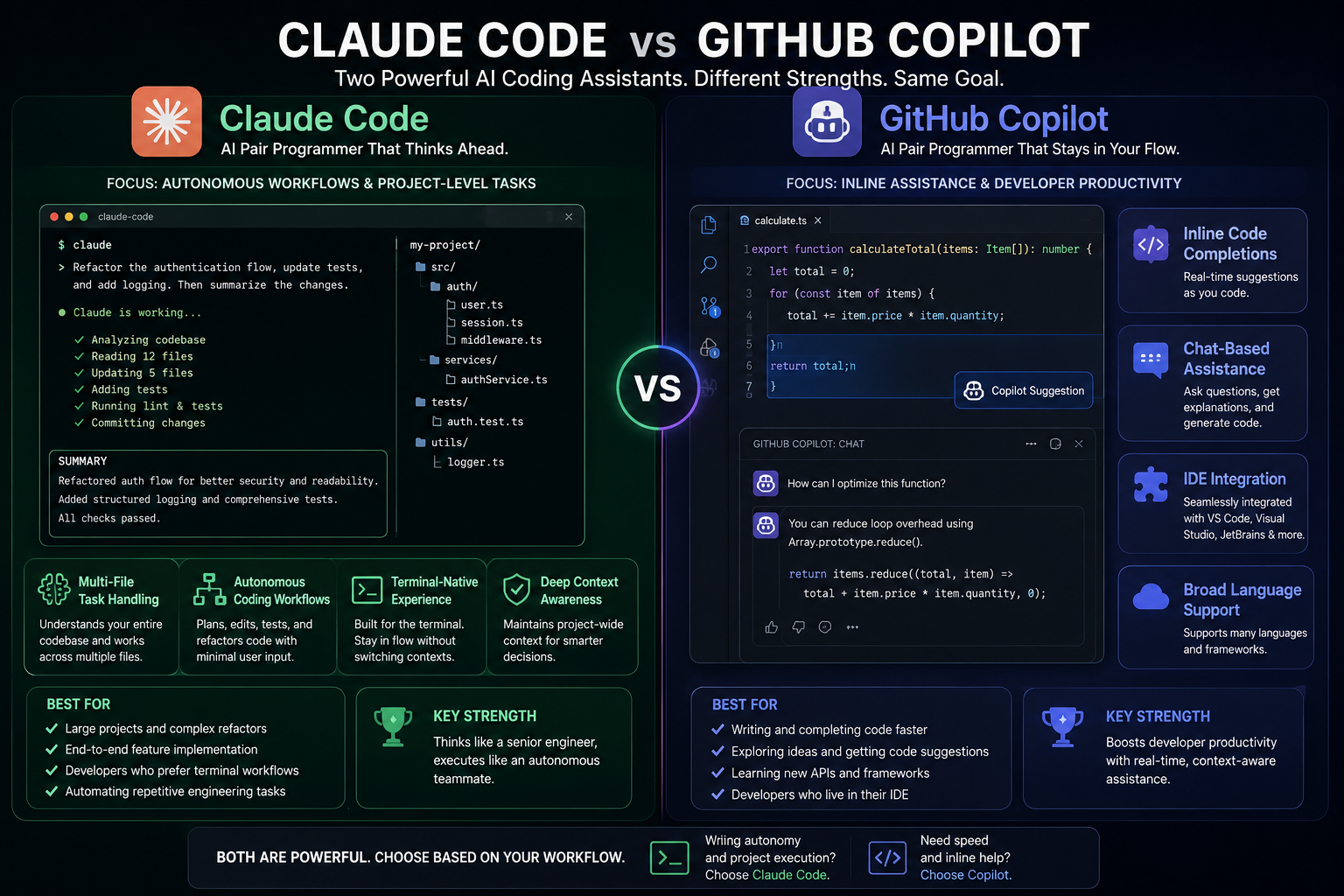
- Claude Code functions as an agentic, terminal-first coding agent, while GitHub Copilot acts as an IDE-embedded assistant.
- The effectiveness of each software depends on whether you prefer to delegate entire engineering tasks or speed up your hands-on coding.
- Claude Code is exceptionally beneficial for complex, repo-wide tasks, whereas GitHub Copilot enhances everyday coding practices.
- Pricing varies, making GitHub Copilot generally more affordable for individual developers.
Table of Contents
- Introduction
- Understanding Claude Code
- Understanding GitHub Copilot
- Core Differences: Autonomy vs Augmentation
- Feature Comparison
- How Claude Code Works in Practice
- How GitHub Copilot Works in Practice
- Pricing and Economic Considerations
- When to Choose Claude Code
- When to Choose GitHub Copilot
- Practical Recommendations by Use Case
- FAQs
Introduction
In the fast-evolving world of software development, automation tools are essential for enhancing productivity. Among these tools, Claude Code vs GitHub Copilot presents a compelling comparison. Claude Code is an agentic, terminal-first coding agent capable of working across your entire repository, while GitHub Copilot is an IDE-embedded assistant tailored for inline code suggestions and chat functionalities. Which one is better? The choice largely depends on whether you prefer to delegate entire engineering tasks or seek to speed up hands-on coding.
Understanding Claude Code
Claude Code, developed by Anthropic, is a robust solution designed specifically for complex coding tasks. Here are its key features:
-
Agentic Coding Agent: Claude Code employs an “agentic loop” to manage coding tasks autonomously. It progresses through a cycle of planning, acting, verifying, and repeating until it achieves the desired outcome. This approach is suited for tackling large assignments with minimal step-by-step guidance.
-
Terminal CLI Interface: This coding tool operates mainly through a terminal CLI, allowing seamless integration into your project. Moreover, it can also be integrated with IDEs, desktop applications, browsers, and even Slack, enhancing its versatility.
-
Handling Multi-File Tasks: Claude Code excels at facilitating complex tasks that span multiple files, such as large refactors, migrations, and debugging subsystems. Its design caters to sophisticated code manipulations without requiring extensive user input.
Understanding GitHub Copilot
GitHub Copilot is engineered to optimize the coding experience by providing contextual assistance directly within your coding environment. Below are its prominent features:
-
IDE-Embedded Assistant: GitHub Copilot integrates directly into popular coding environments such as Visual Studio Code and JetBrains, making it easy to use while you code.
-
Optimized for Inline Completions: It specializes in offering real-time code suggestions, responding to prompts, and can aid in tasks like writing tests or refactoring code without managing the entire project end-to-end.
-
Deeply Integrated with GitHub Ecosystem: As part of GitHub, GitHub Copilot is designed to fit naturally into GitHub-centric development workflows, ensuring a smooth experience for developers.
Core Differences: Autonomy vs Augmentation
When comparing Claude Code and GitHub Copilot, the primary distinction lies in their approaches:
-
Autonomy (Claude Code): Claude Code is built for autonomous, agentic workflows. You issue a high-level goal (e.g., “Fix the failing tests”), and it will conduct tests, inspect error outputs, make edit suggestions, and iterate autonomously until success or a blocker emerges.
-
Augmentation (GitHub Copilot): In contrast, GitHub Copilot is designed to augment your manual coding flow. It provides inline completions and chat functionalities but does not take over the entire workload. Instead, it functions as an assistant that supports your coding tasks without full autonomy.
In practice, Claude Code behaves like a capable collaborator that you can hand a ticket to, while GitHub Copilot acts as a pair programmer who enhances your existing workflow.
Feature Comparison
Here’s a detailed comparison of features between Claude Code and GitHub Copilot.
| Aspect | Claude Code | GitHub Copilot |
|---|---|---|
| Core Role | Agentic coding agent capable of planning and executing multi-step tasks across repositories. | IDE-embedded assistant focused on inline completions and in-editor assistance. |
| Primary Interface | Terminal CLI or integrated via IDE, desktop, browser, and Slack. | Extensions for various IDEs like VS Code, JetBrains, and Visual Studio. |
| Task Model | Goal-driven; takes high-level requests and creates actionable plans. | Interaction-driven; provides code suggestions and responds to prompts. |
| Autonomy | High: can run long tasks, interact with numerous files, run tests autonomously. | Medium: strong support features, but limited to the IDE's environment. |
| Typical Strengths | Complex refactors, migrations, debugging, and working with large systems. | Rapid code snippets, in-place fixes, and explanations during manual coding. |
| Context Window | 200K-token context, expandable to 1M tokens for larger repositories. | Smaller context window, less capable of handling large repositories. |
| Models | Built on Anthropic’s Claude technology. | Uses various models, including GPT-5.4 and Gemini. |
| Extra Capabilities | Can execute shell commands and manipulate files, supporting automation tasks. | Integrates tightly into GitHub and IDEs for deeper functionalities. |
| Customization & Tools | Supports external plugins, rules, and workflows for automation. | Managed with IDE settings; less flexibility than Claude Code. |
| Starting Price | Costs around $20/month, with higher tiers offering advanced features. | Priced around $10/month with credits for additional features. |
| Best Fit | Ideal for teams engaging in complex, repo-wide work, refactoring, or migration tasks. | Best for developers looking for fast assistance with daily tasks. |
How Claude Code Works in Practice
Claude Code leverages several sophisticated capabilities:
-
Agentic Loop
The software follows a structured cycle: it gathers context from the codebase, performs actions like editing or running commands, observes the outcomes, and repeats until it reaches success or encounters an obstacle. -
Repo-Wide Understanding
With its large context window, Claude Code can analyze extensive portions of a repository, identify call chains, and comprehend the impacts of changes across different modules. -
Terminal-Centric Workflow
Users execute commands likeclaudewithin their project directory, providing natural language descriptions of their goals and engaging in a conversational session that displays plans and command outputs. -
Execution of Real Tools
Claude Code’s capability to run tests, linters, and build commands allows it to make data-driven edits effectively. -
Computer Use and Sub-Agents
It can control browser and desktop applications and spawn sub-agents for parallel tasks within intricate workflows. -
Integrations and Workflows
Claude Code is available across various platforms: terminal, IDE plugins, desktop applications, browsers, and Slack, and it can be extended with custom workflows and integrations.
This design makes it invaluable when you want to delegate work units instead of supervising the AI through every modification.
How GitHub Copilot Works in Practice
GitHub Copilot capitalizes on its user-friendly approach and efficient code suggestions:
-
Inline Code Completions
It regularly suggests code as you type in supported editors, often completing entire functions based on your current context. -
Chat-Based Assistance
Users can ask questions within a chat panel, generate snippets, write tests, or request code refactors directly in the editor. -
IDE-Embedded Agents
GitHub Copilot's newer “agent” modes can accept more structured tasks but do so within the IDE’s constraints, which limits repo-wide autonomy compared to Claude Code. -
Multi-Model Stack
The software utilizes various models (like GPT-5.4 and Gemini) depending on the task at hand, ensuring optimal performance. -
Ecosystem Integration
Being intricately linked with GitHub, Copilot fits seamlessly into workflows catering to GitHub and existing services integrated within IDEs.
This design allows Copilot to provide ongoing, lightweight support that reduces boilerplate coding while enabling developers to maintain their workflow.
Pricing and Economic Considerations
-
Claude Code
- A subscription for Claude Pro costs around $20/month when billed monthly.
- Higher tiers are available (approximately $100 to $200/month) for increased usage and advanced features.
-
- Offers individual pricing at about $10/month, often with credit allocations for more intensive features.
For individuals who prioritize inline help, GitHub Copilot generally represents a more cost-effective solution. However, for teams that value comprehensive refactoring and autonomous functionalities, Claude Code's higher pricing may provide significant returns.
When to Choose Claude Code
Choosing Claude Code is particularly beneficial in situations where:
-
You Routinely Work on Large, Complex Codebases
Its extensive token context and multi-file handling capabilities make it ideal for large repositories or complex systems. -
You Want to Delegate Substantial Tasks
You can easily assign whole tasks, like “migrate our auth system to OAuth 2.1,” allowing Claude Code to plan, edit, and test autonomously. -
You're Comfortable in the Terminal
Claude Code's CLI can function alongside any editor, making it suitable for users who prefer an editor-agnostic approach. -
Advanced Orchestration and Tool Integrations are Necessary
Its ability to use external tools and systems through plugins and hooks makes it valuable for complicated projects.
These aspects cater to senior developers, platform teams, and organizations requiring ongoing maintenance on complex projects.
When to Choose GitHub Copilot
GitHub Copilot is usually a better choice when:
-
Your Priority is “Typing Faster”
It maintains flow, providing fast assistance and freeing developers to focus on core tasks. -
You Heavily Utilize the GitHub + VS Code Ecosystem
Its seamless integration with GitHub-centric workflows makes it an excellent fit for developers working in this environment. -
You Want Low-Friction Adoption for Mixed-Experience Teams
Its intuitive autocomplete and chat features can be realized without substantial workflow changes. -
Budget and Simplicity are Crucial
With lower monthly costs and a simpler model, Copilot can be the straightforward option for many teams.
Practical Recommendations by Use Case
Here is a brief evaluation based on developer needs:
- Individual Learners and Junior Developers
- GitHub Copilot is often the ideal choice; it offers learn-as
3 curated tools below.

Claude
Claude is Anthropic's AI assistant for nuanced writing, long-context reasoning, and coding via Claude Code. The Claude 5.5 family (including Sonnet 5.5, launched September 28, 2026) is the current default for fast, cost-efficient professional and coding work on claude.ai and the Claude API.

Gemini
Gemini is Google's multimodal AI assistant and model family across the Gemini app, AI Mode in Search, AI Studio, and the Gemini API. As of October 2026 the frontier flagship is Gemini 4 Argon (paid API / Pro+Ultra surfaces); Flash-class models remain the cheaper workhorse for high-volume agents.

Github Copilot
GitHub Copilot is GitHub's AI pair programmer that provides code completions, chat, agents, code review, and CLI assistance inside IDEs and GitHub.com. As of June 2026 it uses GitHub AI Credits for usage-based billing across chat, agent mode, cloud agents, and code review. It supports multiple models including Claude, GPT, and Gemini variants depending on plan.
| Tool | Best for | Pricing | Billing note |
|---|---|---|---|
| Claude | AI chatbot / reasoning & coding assistant | Freemium | Free Trial |
| Gemini | Productivity | Freemium | Free Trial |
| Github Copilot | Code Assistant | Freemium | Free Trial |